I'm not learning coding from LLMs, but product design
I am a very boring programmer. The majority of my hand-coded projects are variations of linear scripts that flow from top to bottom. On super fancy occasions I'll break out the object oriented patterns to store the data I need. On the rarest of rare occasions I'll bust out that map(), reduce(), zip(), and lambda. When I have to muddle through some kind of algorithm for something, you'll often find me pacing about muttering to myself as I physically map out steps and branches as I convince myself I hadn't left something out.
This is all to say, I take very little joy in coding. I'm excited for when the results are what I want them to be, the process itself is hardly something I revel in. If anyone asks, this is the primary reason why I never fully went down the SWE route despite being competent at working with code. It's not exciting in the same way I see various peers who are excited about writing code. Hence, I ultimately went down the data science/UX researcher route because figuring out data puzzles surrounding how humans are doing things is much more exciting to me.
Recently, I've been seeing more people who write code for a living, and more important, the people who enjoy writing code for a living write commentary on how the advent of LLM coding in whatever style you choose, be it full on vibe-coding, to only rubber ducking, to everything in between, has brought them various forms of unhappiness. From my observations, it's primarily because they tangibly feel the gradual decay of skills that they built up over years of deep work with code, though I'm sure there are other complex feelings about this that I'm not capturing here.
Given my ambivalence towards coding, you'd be correct in assuming that I don't have strong opinions about the decay of any coding skills that I very likely wasn't exercising anyways. What I did find in this new age of "fast fashion code" is that I'm learning a set of different skills that are interesting to me as a UX person – fundamental product design.
As I've mentioned in previous posts, I keep making silly little utilities to scratch very particular itches of mine that would honestly be too esoteric and time consuming to ever do without the aid of LLM generation, a forum system that integrates with Bluesky's ATProto, a world history generation simulation, a sky visibility calculator, a paper trading finance bot. In ALL of these, I make a lot of progress building the tool when it is an abstract concept of data bits flying around being calculated on. There is consistently one place where things fall apart and slow to a crawl – making the interfaces. One, because LLM tools are utter garbage at putting together proper, human-centered user interfaces. The other is that I've worked in software, and UX long enough that while I don't have all the answers for what is right to do for an interface, I at least have a decent sense of when something is unusable garbage.
So while most of the programs I'm creating these days are essentially just "do this interesting thing, plus the Create-Read-Update-Delete (CRUD) operations around them", getting even these most basic interactions correct has been... a learning process. And I'm going to illustrate that point with this week's silly itch scratching tool.
Storyindex, a dumb local tagging/searching/reading tool
 randyau
This latest tool was based off my data hoarding tendencies. I've got archives of text on my computer that I've accumulated over the years, personal writing, papers and drafts that I've saved, maybe there's an old dump of some fanfic archive in the 2000s that I rediscovered while sifting through old folders. Don't judge me. Heck, maybe you've downloaded a giant chunk of Project Gutenberg or stuff from archive.org's various collections. Wouldn't it be fun if all the documents were tagged with not "the topic", not keywords about what the text is about, but more interesting things like "what tvtropes show up in this writing?" I thought it'd be sorta fun to go through giant libraries of text and figure out how many "Cinderella Stories" are in the collection, intersected with some other attributes. This is the kind of thing that is only really possible with either crazy specific NLP techniques, or LLMs. But these are all arbitrary private chunks of text that maybe you never want to ever let see the light of day, let alone some LLM vendor. The only solution would be to run a local model tagging system.
Storyindex is my hacky solution to this problem. It runs as a local Flask webapp that you connect via browser. It'll create a sqlite database for a collection of files. You can then use the web interface to just dump arbitrary files to be read into the sqlite db, or you can write a special parser based off an example that can feed more detailed title/author/source information into the database in accordance to whatever special schema you want.
Once data is ingested, you write a basic LLM prompt that is run against each file for tagging purposes, for example something like "If this story resembles a cinderella story, emit the tag "cinderella_story", otherwise emit nothing". You can then run this tagging prompt across the entire set of files you have in the database, and it'll add tags. Once done, you can browse the entire library, search for keywords, search for tags, do the expected boolean operations. Overall it's a cute way to play with text data. The key here is that all this is only done with a local LLM, so you can be as weird as you want and all you waste is your own inference time and electricity. No risk of someone finding out you're Really Into ChArTs or something.
More fun is that there's some abstractions in there so you can get very creative. Have a giant collection of comics or manga and want to do the same thing? If you manage to get transcripts or OCR data, you can associate each book scan with a transcript, ingest those into the system with a file handle reference to the original comic, and do all that interesting trope searching stuff. You're only limited by the throughput of your hardware.
But oh, the UI madness
The concept itself is pretty straight forward, but the interface is, and continues to be, a huge challenge. I essentially got to put on my UX Designer and Product Manager hat. Here's how the UI changed over time for the "tagging job management" page:
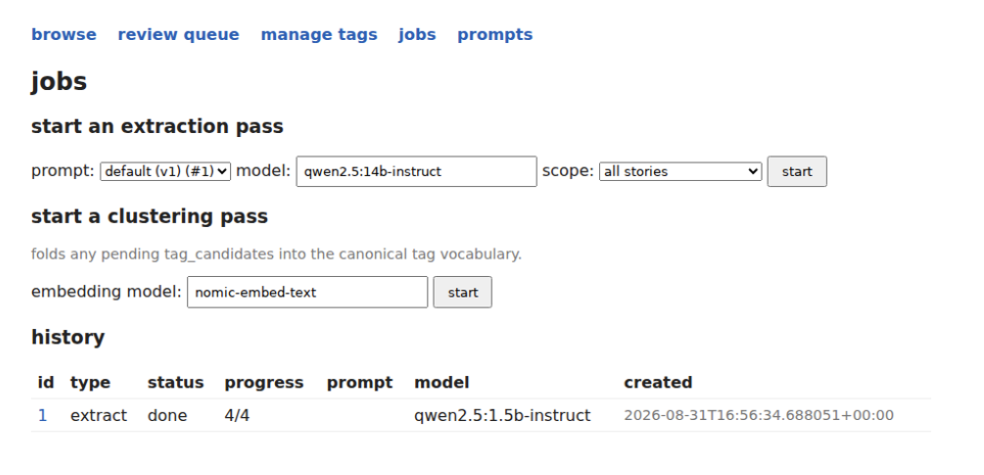
First it was just a simple "Apply this prompt, using this model, on all/some of the stories in the db". The "clustering pass" is essentially unexplained but it does embedding clustering on all the tags to de-dupe. It's also just got a big list of job histories. Notice the top nav only has the most bare minimum features.
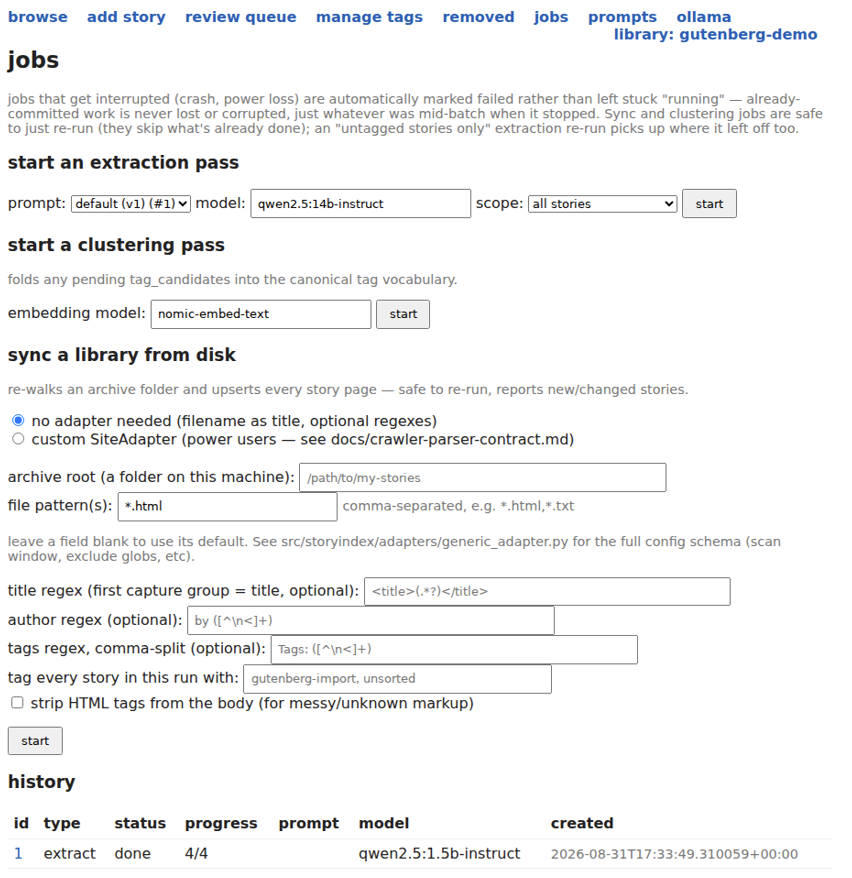
The next major version involved adding the "sync library from disk" feature which pulls a disk archive and updates entries – imagine if you used wget to archive a site and now refreshed it to catch new posts. It still lives on the page because it's a 'job' but it's unrelated to the whole "tag the texts" job that is also on the page. The top nav also picked up a bunch of other menu items.
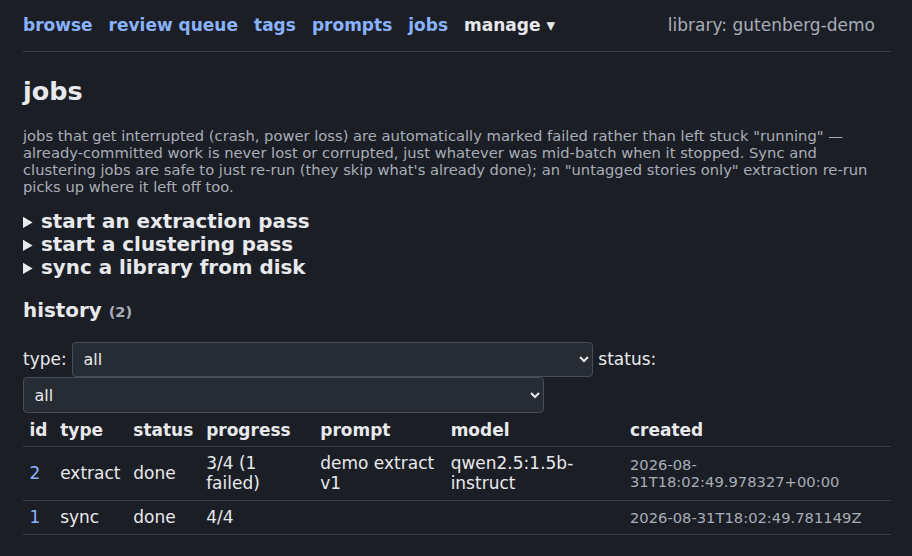
The next major revisions came from simplifying some of the walls of text involved by placing functionality behind expandable sections. You can even see the top nav has moved a bunch of the less used functions into the "manage" dropdown. Also, yes, dark mode was implemented so my own eyes wouldn't melt.
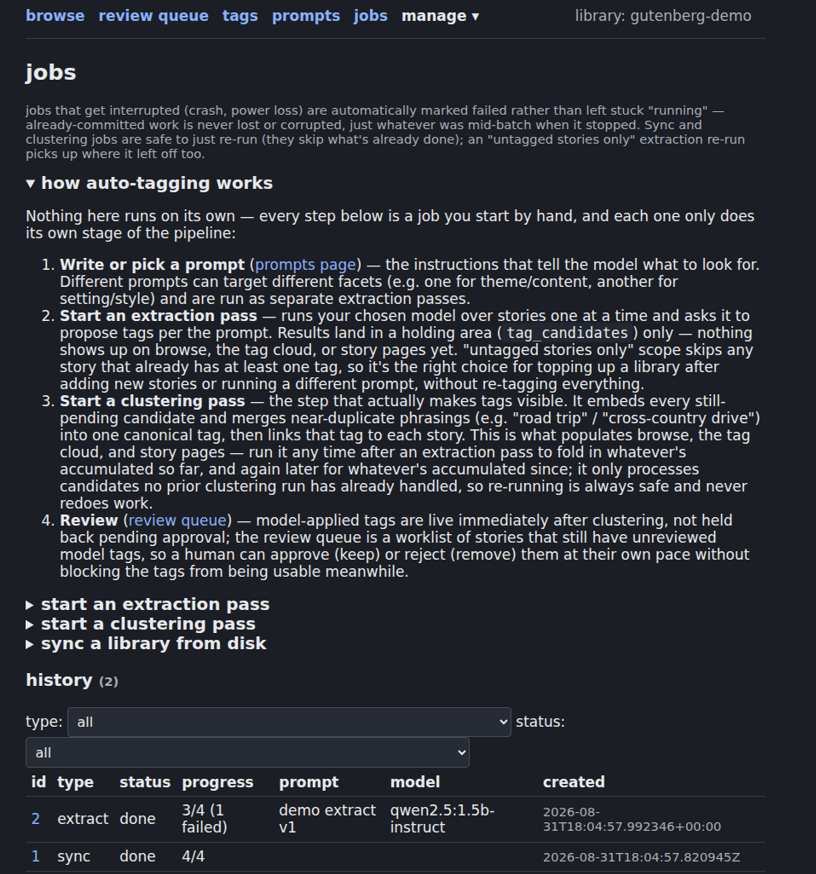
Then things got too simple, and the mental model of the whole program got too complicated, so I had to put back in some walls of text to clarify what everything did...
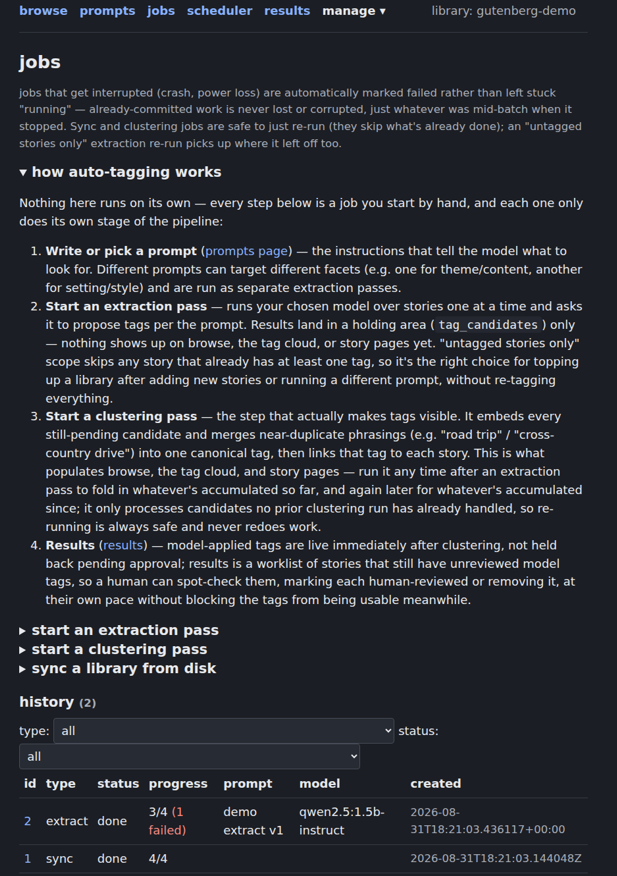
The current version of the page still has lots of issues with it. It's really verbose because I haven't had time to refine it. The calls to action are still not natural. But all these are small nits compared to the bigger overall design of the whole application. For example, my GPU is a RTX 3070 with a mere 8GB of VRAM on it, it runs crappy models at molasses speeds. One test set of data I was wrangling was going to take something like 8 days to process. I had to specify the design of how the system handles crashes and job resumes. While debugging the performance, I learned we needed to implement a job scheduler process to maximize prompt cache hits because it really matters on such a slow system.
On other pages, I had to notice fussy details like how the names of stories should be sorted in a way that ignores the common stop words of A, An, The. There's a section at the end of a post that is "more from this author" which seemed like a cute idea at the time but is honestly boring and should maybe be replaced with something else. Even things like the font size, color contrast, and horizontal width of the text on the screen needed tweaking to stop making my eyes bleed. It's just decision after decision after decision that many of us who work on data on the back end never need to interact with. Forcing myself to engage with the design of the system, with how the user flows move and what problems a normal user would have meant doing all sorts of work that isn't needed to make the software function, but was necessary to make using the tool not torture. It's more empathy for my UX Designer colleagues. It's also a bit of empathy for my product manager colleagues who are at least partly responsible for deciding feature roadmaps and design.
You would think that the workflows in my little app would be simple – define your prompts, import your text, press a button to smash them together! And yet here I am sitting here with near unlimited engineering resources (OK I'm on a $20 plan, but that's near infinite as far as my tasks go), and getting a usable piece of software is a challenge. It's not even a challenge of "am I able to articulate what I want to the LLM" that you may suspect. It's actually deciding what things should be – what layout, what wording, what features, what interactions. Once those decisions are made, articulating them is generally easy.
So yeah, in the world of shitty LLM code, I'm certainly not expanding my raw coding skills. But I've found something fascinating to learn from instead... anticipating user needs and building out features while composing them into a usable software product instead of a pile of arbitrary knobs and buttons. I'm sure this isn't everyone's cup of tea either, but to me, it's fascinating.
Dry aging some beef!
Earlier this week, Tan Ho was posting about dry aging beef at home, with temperature and humidity charts, and code for the monitoring system! I may have pestered him a bit about writing something up so I could link to it.
Since I haven't been able to convince the spouse to let me get a mini fridge dedicated to letting a giant chunk of meat get old and funky, this is the closest I can get to nerding out at the process.
 Tan Ho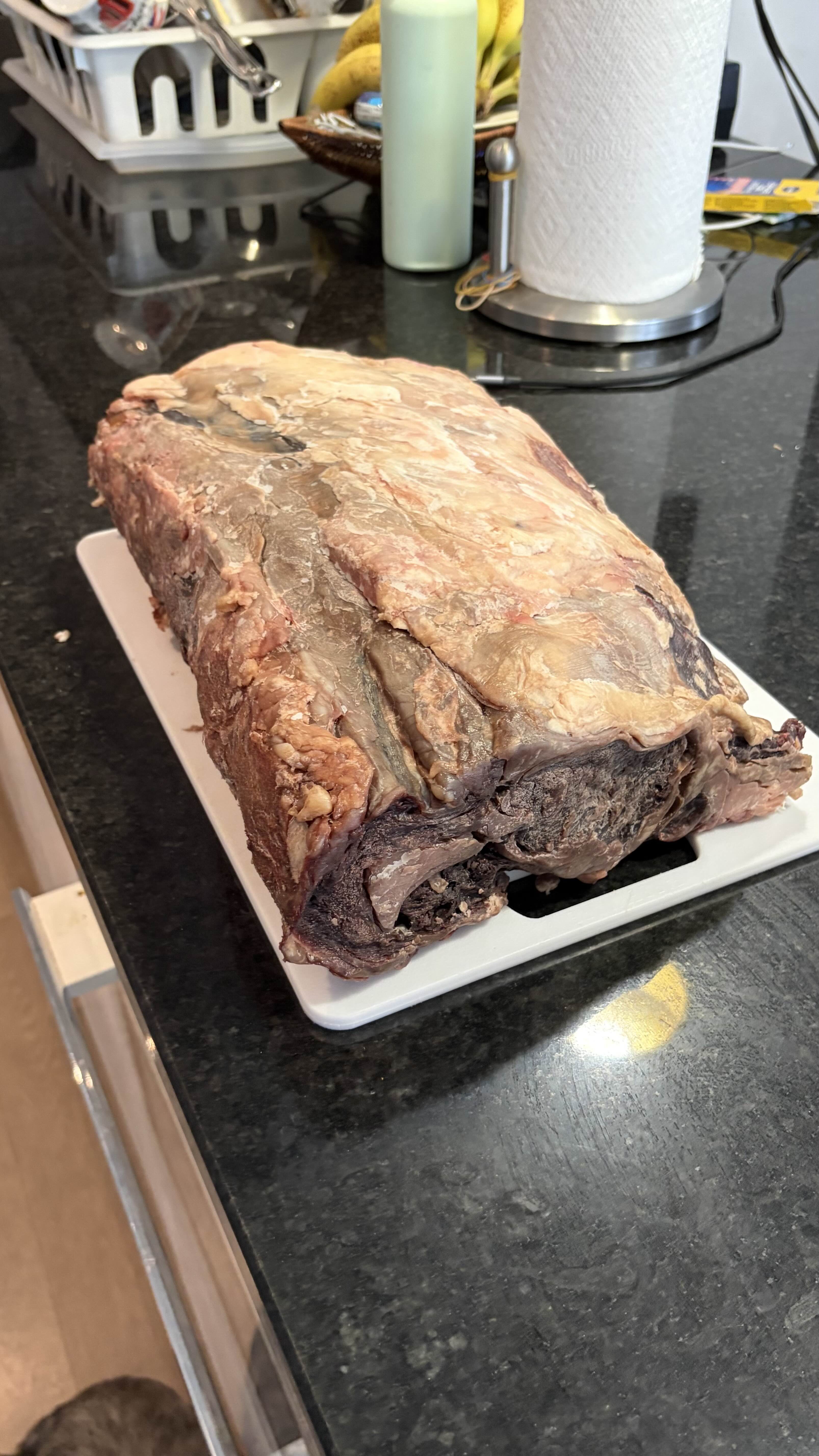
Standing offer: If you created something and would like me to review or share it w/ the data community — just email me by replying to the newsletter emails.
Guest posts: If you’re interested in writing something, a data-related post to either show off work, share an experience, or want help coming up with a topic, please contact me. You don’t need any special credentials or credibility to do so.
"Data People Writing Stuff" webring: Welcomes anyone with a personal site/blog/newsletter/book/etc that is relevant to the data community.
Counting Stuff Official Forums: Discuss posts, or other data topics with the community.
About this newsletter
I’m Randy Au, Quantitative UX researcher, former data analyst, and general-purpose data and tech nerd. Counting Stuff is a weekly newsletter about the less-than-sexy aspects of data science, UX research and tech. With some excursions into other fun topics.
All photos/drawings used are taken/created by Randy unless otherwise credited.
Supporting the newsletter
All Tuesday posts to Counting Stuff are always free. The newsletter is self hosted. Support from subscribers is what makes everything possible. If you love the content, consider doing any of the following ways to support the newsletter:
- Consider a paid subscription – the self-hosted server/email infra is 100% funded via subscriptions, get access to the subscriber's area in the top nav of the site too
- Send a one time tip (feel free to change the amount)
- Join the Approaching Significance Discord — where data folk hang out and can talk a bit about data, and a bit about everything else. Randy moderates the discord. We keep a chill vibe.
- Get merch! If shirts and stickers are more your style — There’s a survivorship bias shirt!