How does MP3 compression do its thing?
Over the week, as usually happens, I was doing one thing and fell down a rabbit hole that wound up being this week's post. I was working on gathering a bunch of my music from my collection to put into a thumb drive to use while making a 2-hour drive. In so doing, I had to pick up individual songs to toss onto the drive, and along the way went through some of the older things in my collection.
As a point of reference, I've carried my digital collection of music with me continuously for the past thirty years when I started ripping CDs to MP3 and downloading individual tracks off the internet back then. We're talking about music like old anime opening songs from the 90s, encoded as 128kbps CBR (Constant Bit Rate). At the time, 128kbps mp3s were like magic because they were small enough to download in maybe 10-20 minutes via a dial-up modem while sounding amazingly good compared to the alternatives of the time (primarily mp2, RealPlayer, WMA, and a few other really obscure formats).
Well, I was listening to those ancient files as I was picking out music, I thought they sounded amazingly terrible. They weren't unlistenable, but if you were paying attention they sounded compressed, veiled, sometimes muddled, with oddly harsh higher frequencies. At first I suspected it was because I was finally listening on a decent audio setup instead of the horrible computer speakers and headphones I used in my teenage years. At the time, I wouldn't have noticed because we were watching shows of 5th-generation VHS copies on an ancient mono-speaker TV. Everything sounded sorta like mud regardless.
So then I went out and found the the lossless version of the same song, and on my current computer it was markedly clearer and smoother. Then I played with encoding the same song using a modern MP3 encoder instead of the ancient encoders of the late 90s, and those files sounded significantly better than the old version. There was a lot of stuff going on.
- My audio equipment and ability to discern differences have definitely improved over the years, my ears have luckily not degraded with age as much as expected
- The MP3 encoders themselves have shown massive improvement over the years too, getting better audio performance for the same amount of bytes used
- There's also some psychological things to account for, like expectancy bias. Also I had to make sure I volume matched the different versions or else the louder version inevitably sounds better (a well-known issue in blind audio testing)
Another issue is that it is hard to use language to characterize these differences. To my ears I can hear noticeable differences if I pay attention. The second I go off to do a second task and lose focus, it's much less likely that I will get annoyed at the audio quality even for the older 128kbps file. The 65kbps file is noticeably degraded regardless but even that is listenable at a background level. In order to draw contrast, I have to use language that highlights those differences but depending on what your particular ears and setup is capable of you may or may not notice differences. My spouse who obviously does not care about audio nearly as much as I do and doesn't have the vocabulary for it has trouble noticing any difference between the files.
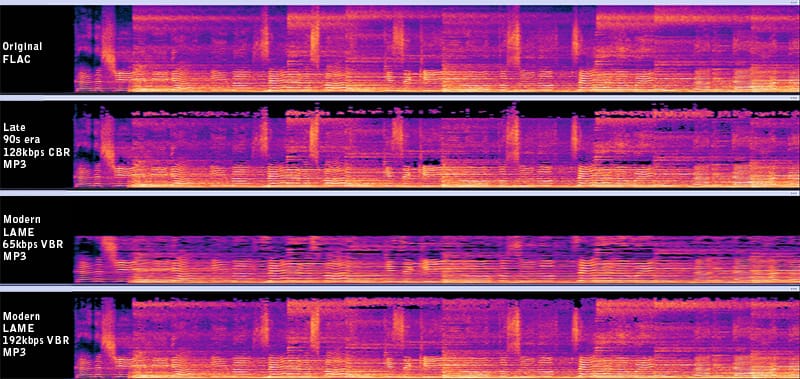
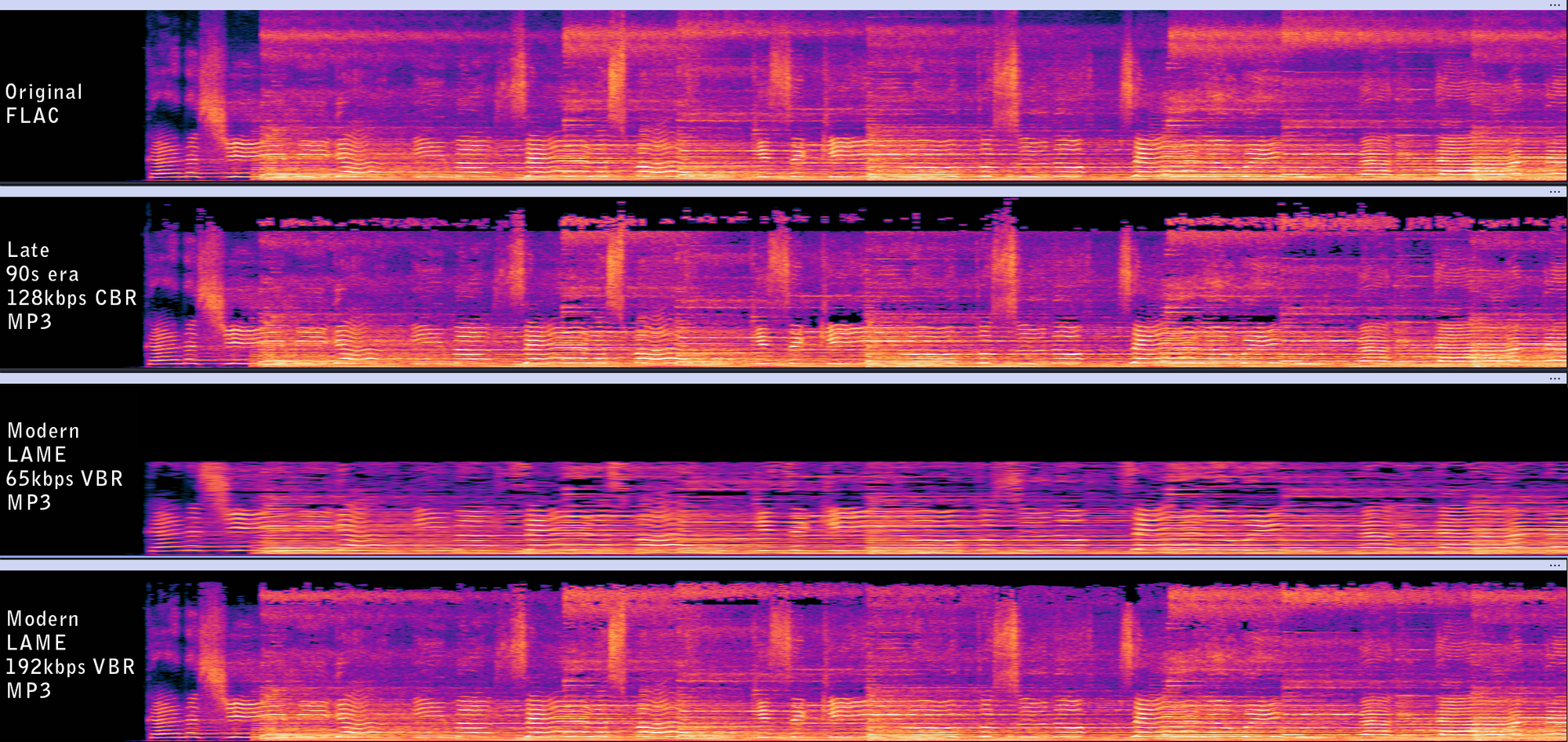
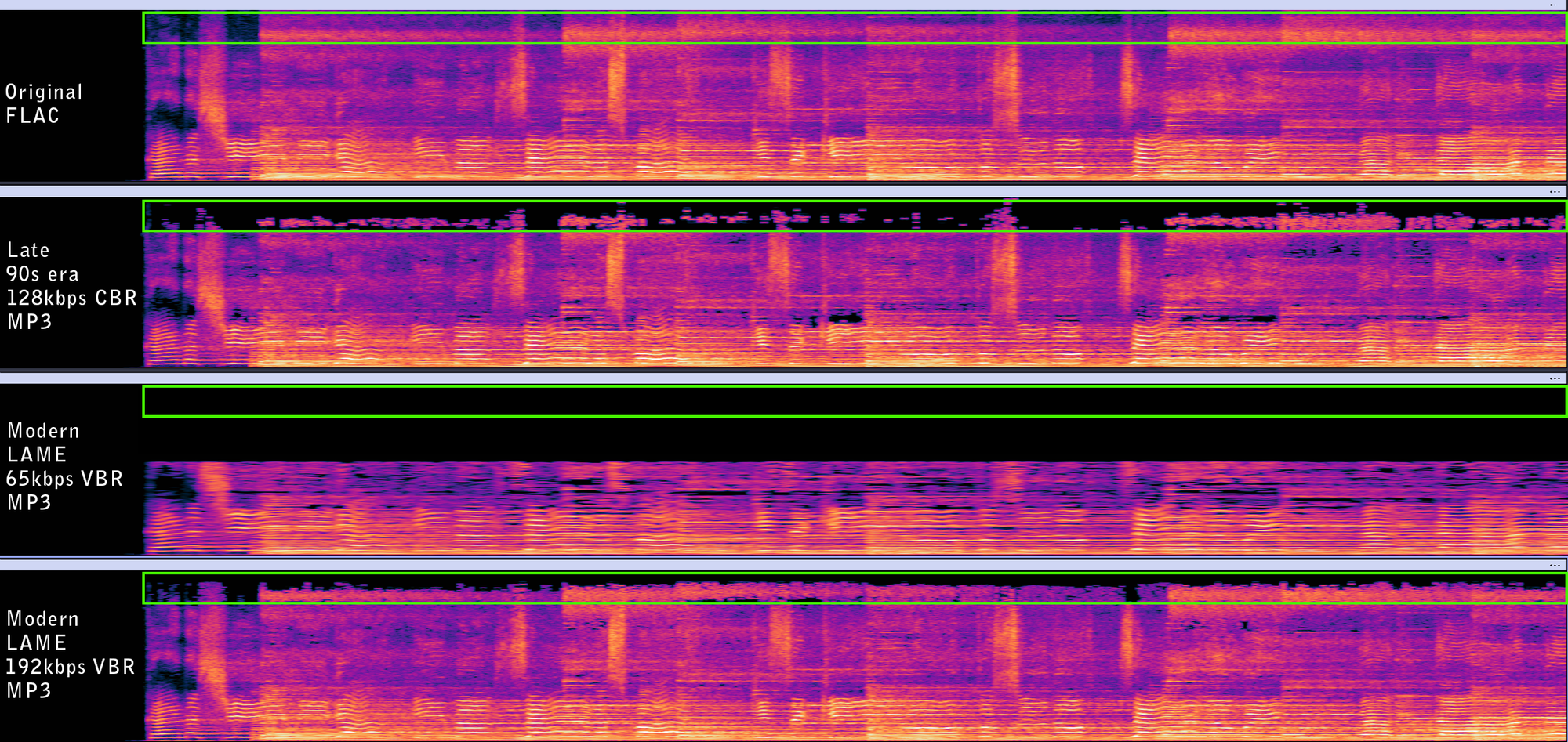
Regardless, I did what any nerd would do – I dumped the files into Audacity and pulled up the spectrograms of each file to visualize what was going on with the audio data. Below are the identical tracks, for the Right channel only, scaled so they are all identical in size, coloring, and everything else. Just qualitatively it's utterly fascinating. Just at a high level here's what I could see
- The older 128kbps CBR file had a pretty hefty cutoff above 14khz or so. Most of that area is black, with only small bursts of sound information being preserved
- The modern 65kbps VBR (variable bit rate) surprisingly cuts out almost ALL data beyond about 11khz. despite that, it sounds somewhat comparable to the old 128kbps file. If I were jogging with cheap headphones and not paying attention, it would be acceptable!
- The 65kbps VBR file is also decidedly "blurrier". The little bright streaks of color running across the lower third of the spectrogram represent the vocalist and the harmonics associated with their singing. The highly compressed version blurs a lot of that detail out.
- The modern 192kbps VBR file, which sounds really close to the original, still shows clear dark spots, and signs of cutoffs at various frequencies. But it clearly retains a lot more detail than the old 128kbps file.
But understanding what is going on within the files means understanding what the compression algorithm is actually trying to do, so let's get that out of the way.
The MP3 compression algorithm
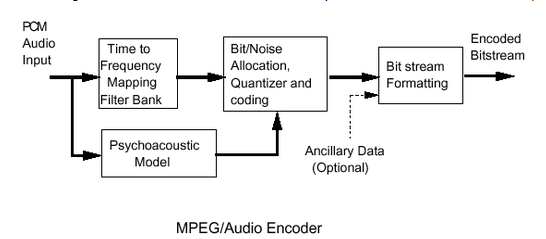
At a very high level, the mp3 algorithm, which you can find overviews about on the internet, work something like this. MP3 breaks up a song, which is a sequence of audio samples, into a frame of about 26ms in length, composed of two "granules" which can be "long window", or broken into three smaller "short windows". The entire frequency range of the granule is mapped into 32 equal width frequency bands. Those bands are later transformed using Modified Discrete Cosine Transform (MDCT, similar to the compression used in JPEG) to become a set of bins of frequency data, either 576 for a whole "long window", or 3x 192 for the "short windows". Window length is chosen based on whether the audio needs to preserve more precise timing with short windows, or if it can instead use more detailed frequency bins for a longer window.
In actual use, the windows are actually designed to overlap by 50% with the previous or following windows. The results of the overlapping windows are essentially crossfaded with each other to avoid sharp artifacts at window boundaries.
The MDCT frequency bins store info about how much sound is in that frequency range. However, since humans hear different frequencies differently (See the previous post about loudness), the frequency bins are then grouped into non-linearly spaced bands that are processed through the psychoacoustic model. The model has heuristics for what audio data it can throw out, for example sounds below the normal hearing threshold for a frequency or things like very quiet sounds that come immediately before/after a very loud sound. Bands are given a threshold level, and if within a frequency bin for that band, if there's not enough energy in the bin then its value gets rounded to zero, otherwise it gets included in the compression.
Ultimately, each frame has a budget of bits it can use to store data, and so the algorithm tries to allocate the most number of bits towards the parts of the song data by a quantization process that tries to compress the MDCT coefficients within the bit budget without introducing audible noise. For high compression ratios, it might not be able to find a solution and so noise and distortion happen. For more advanced implementations the algorithm can even "save" unneeded bits from prior frames, those extra bits can be used later in more complex parts of the audio where more bits are needed. Throughout, thanks to how the psychoacoustic model is defined, parts of the music that are deemed inaudible for various reasons are essentially thrown out.
If you want more details about the actual encoding process, including the math parts, you can check out this detailed "Perceptual Coding of Digital Audio" paper. It covers not just MP3 but many other audio compression methods.
How it plays out in the audio
With that overview behind us, we can get a better idea of what is going on with these files and spectrograms.
First, the cutoff regions. In the spectrograms below there are green boxes covering roughly the range of 16khz and higher. You can see the original song has lots of signal up there, but that region is significantly cut down in the compressed versions. The old 128kbps one only retains uneven splotches of signal. The 65kbps literally cuts the whole section out to save space. The modern 192kbps one retains a surprising amount of detail but still scrubs out a decent amount of it. Since these frequencies are very hard for humans to hear unless very loud, most adults over 30 have trouble hearing almost anything above 16khz while teenagers can, they're deemed less important to retain than the lower frequencies.
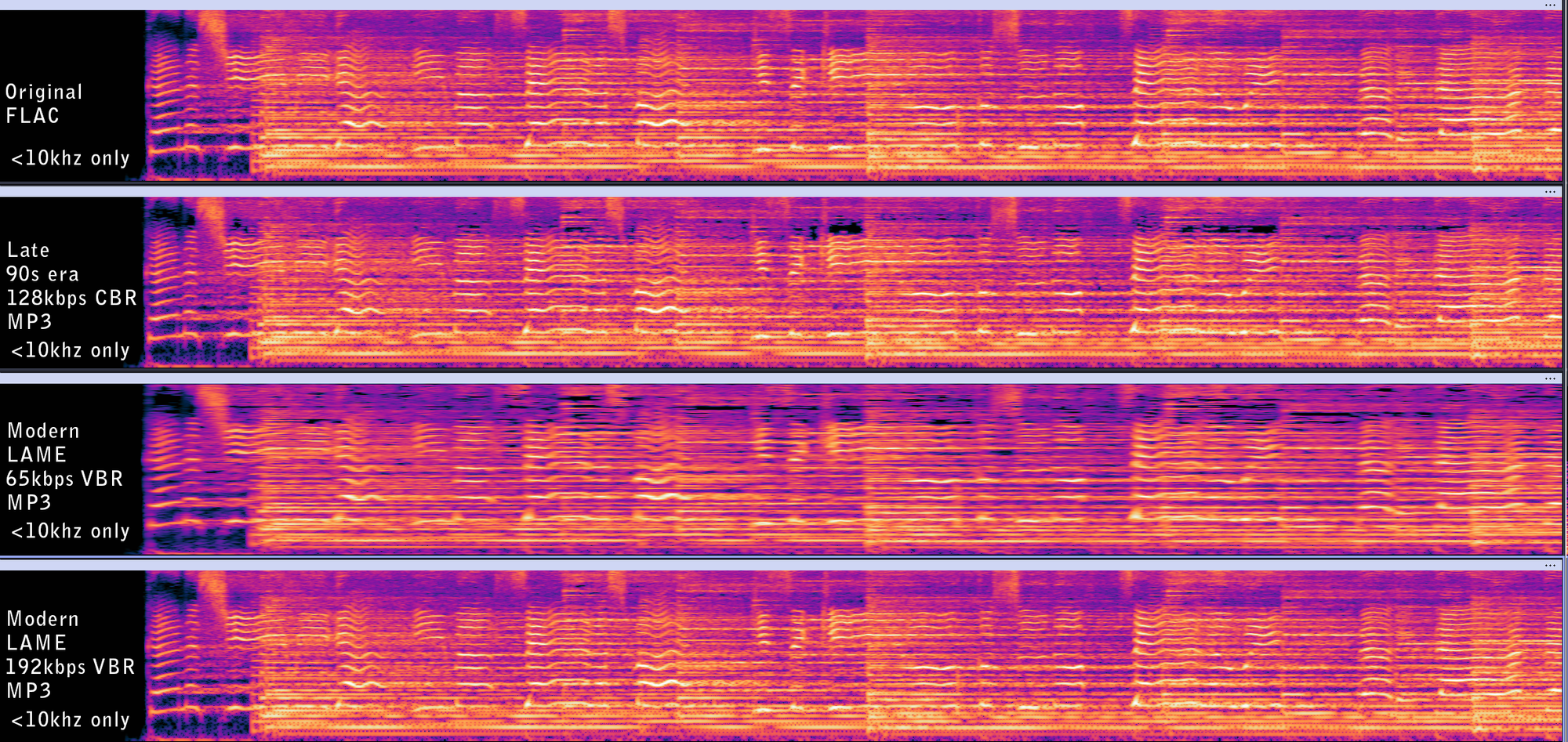
When we zoom down into the lower frequencies under 10k, where the majority of human hearing sensitivity is focused, you can still see the algorithm at work. The 65kbps file is noticeably "fuzzier". The quantizer is struggling with the minimal bit budget and the best solution it can find is to squash things together. In terms of audio quality, things sound less crisp and detailed. For the 128kbps file you can see that there are black "holes" in the signal even though the original is essentially a continuous wall of sound. It is also blurry compared to the original and the 192kbps, but not nearly as bad as the 65kbps version.
But if you just visually compare those glowing spectrograms by eye, you'd be led to believe that they must sound very close since all the general contours are there. But if we zoom in, there's actually even more little subtle things going on. Here's a zoomed-in section of the first bit that has about four vocal sounds in it, with a notable big blob of spread-out signal in the middle which is a sibilant "S". I zoomed in on that section, carefully overlaid them in Photoshop and took the difference of the pixels. That shows where the two files disagree.
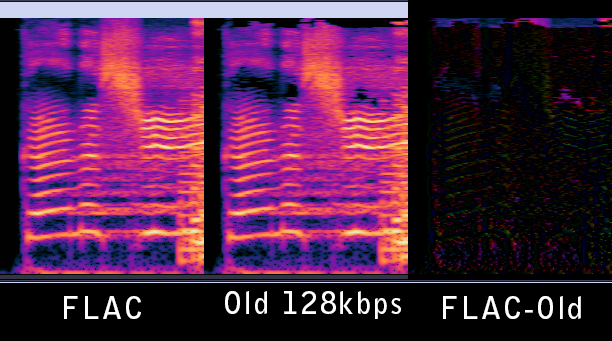
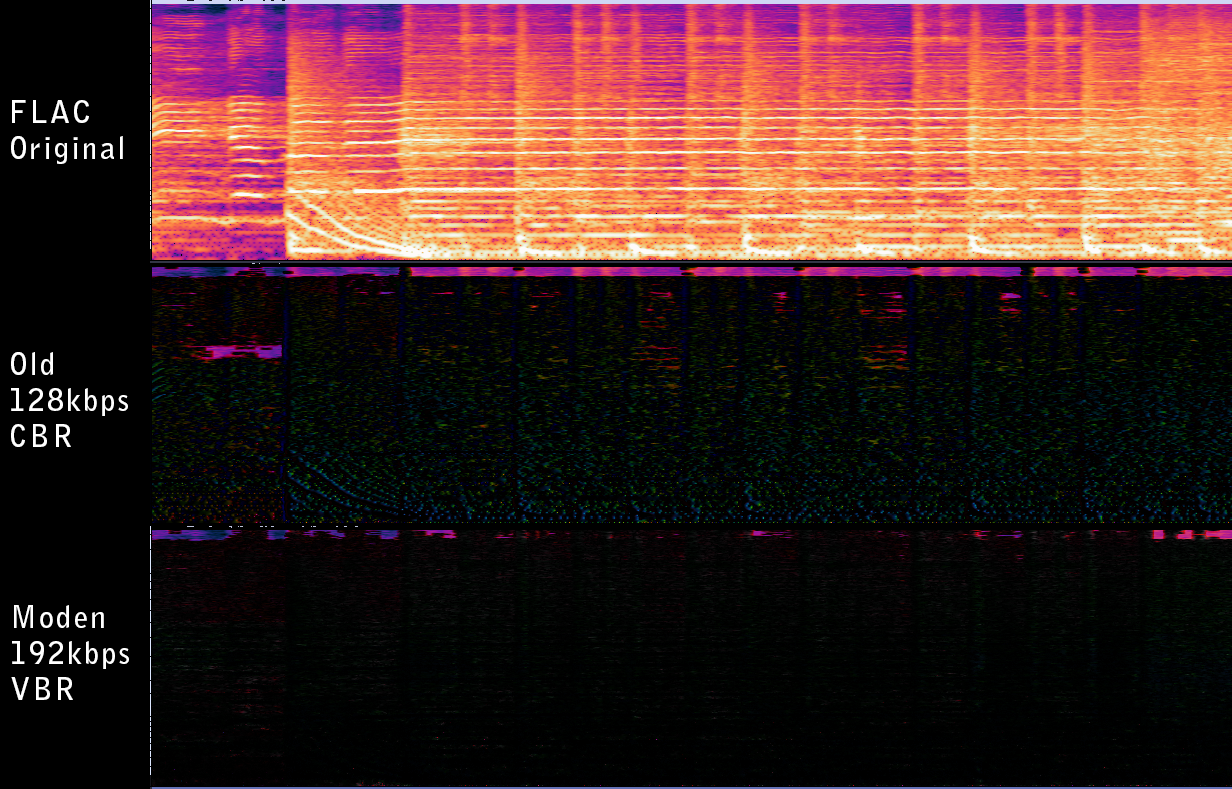
The difference essentially shows where the old algorithm removed data from the original. You can see the ghostly contours of the voice where the algorithm removed a little bit of almost every major frequency that made up the singer's voice. There's vertical color stripes along the file, those seem to be where quantization errors on strong loud/soft transitions got blurred. The idea is like if someone suddenly rang a clear bell, you'd expect all the signal to happen in the same instant, but the compression actually pulled a bit of the energy forward in time, likely because it erroneously chose to use a long window (~26ms) instead of three short ones (~4ms each). Since the quantization error in granules are uniform across the window, this means there's noise at the wrong timing. Apparently humans can identify timing errors of around 1-5ms for sound onset, so this causes an audible weirdness that people call "pre-echo" or "temporal noise smearing".
For contrast, we can do the same analysis with the newer 192kbps file. While there are definitely bits taken out for compression reasons, you DON'T see such clear artifacts. Those contours and vertical stripes are either missing or much less prominent. Both have the stripe of color where the top frequencies were trimmed, but the modern version kept a lot more of it. Artifacts only start showing up more as the song builds in complexity and has signals all over the spectrum. Having 50% more bits to use on average let the algorithm keep significantly more sonic detail, on top of having a much more optimized set of heuristics to apply the compression algorithm.
This is honestly why the modern recommendation is that the LAME MP3 encoder at 192kbps VBR is extremely good to use if you must use the MP3 format. Consensus is that 192kbps VBR is comparable to 320kbps CBR at significantly smaller file sizes. Nowadays we have more modern algorithms like Opus (and its predecessor, Ogg Vorbis) or AAC that have better algorithms for even more quality at lower bitrates.
Either way, all this shows is that I have a lot of music lurking around in my collection that sounds (relatively) terrible and now I'm going to have to dig my old CDs out of storage and or find other ways to obtain better versions of them. And I better do it while my hearing still lets me hear >15khz.
Standing offer: If you created something and would like me to review or share it w/ the data community — just email me by replying to the newsletter emails.
Guest posts: If you’re interested in writing something, a data-related post to either show off work, share an experience, or want help coming up with a topic, please contact me. You don’t need any special credentials or credibility to do so.
"Data People Writing Stuff" webring: Welcomes anyone with a personal site/blog/newsletter/book/etc that is relevant to the data community.
Counting Stuff Official Forums: Discuss posts, or other data topics with the community.
About this newsletter
I’m Randy Au, Quantitative UX researcher, former data analyst, and general-purpose data and tech nerd. Counting Stuff is a weekly newsletter about the less-than-sexy aspects of data science, UX research and tech. With some excursions into other fun topics.
All photos/drawings used are taken/created by Randy unless otherwise credited.
Supporting the newsletter
All Tuesday posts to Counting Stuff are always free. The newsletter is self hosted. Support from subscribers is what makes everything possible. If you love the content, consider doing any of the following ways to support the newsletter:
- Consider a paid subscription – the self-hosted server/email infra is 100% funded via subscriptions, get access to the subscriber's area in the top nav of the site too
- Send a one time tip (feel free to change the amount)
- Join the Approaching Significance Discord — where data folk hang out and can talk a bit about data, and a bit about everything else. Randy moderates the discord. We keep a chill vibe.
- Get merch! If shirts and stickers are more your style — There’s a survivorship bias shirt!